A Clear Way to Manage Teams
A Clear Way to Manage Teams
A Clear Way to
Manage Teams
Temflow Operational CRM for Team Management
Temflow
Operational CRM for Team Management
Temflow is a B2B system that brings tasks, scheduling, and communication into one place,
helping managers stay focused and keep their team aligned.
Temflow is a B2B system that brings tasks, scheduling, and communication into one place,
helping managers stay focused and keep their team aligned.
1
The Product And My Role
Temflow is an operational CRM built for senior managers and team leads.
I led the product end to end, from research to final design.
2
Too Many Channels, No Clear View
Managers handled tasks and updates across emails, chats, and spreadsheets.
With everything scattered, it was hard to understand what mattered and important tasks slipped.
Who should handle this task ?
Briefing
Assign

New task
trigger

Upload the brief
Update
Updating management
Schedule
Updating files
Log
Who should handle this task ?
Briefing
Assign
New task
trigger
Upload the brief
Update
Updating management
Schedule
Updating files
Log








3
How I shaped the direction of Temflow
After reviewing tools like Monday, Asana, Trello, ClickUp, and Wrike, I saw they focus on lists, not team performance. They don't show who’s overloaded, who’s stuck, or where issues repeat.
1
1
The Product And My Role
Temflow is an operational CRM built for senior managers and team leads.
I led the product end to end, from research to final design.
2
2
Listening First
These users cover the main roles that keep projects moving planning, execution, HR, and daily operations. Each one faces a different pain point, and together they represent the full workflow Temflow aims to fix.
Team Planning Manager
Works with: 25–40 employees Oversees multiple projects at once and needs a clear picture of team capacity.
Project Architect
Works with: 8–12 team members Handles daily project tasks, documentation, and cross-team collaboration.
HR Manager
Works with: 40–200 employees Manages time-off, staffing, availability, and approvals.
Pain points:
No visibility into employee workload
Tasks stretch due to missing follow ups
Communication scattered across WhatsApp, and reports
Team Planning Manager
Works with: 25–40 employees Oversees multiple projects at once and needs a clear picture of team capacity.
Team Planning Manager
Works with: 25–40 employees Oversees multiple projects at once and needs a clear picture of team capacity.
Project Architect
Works with: 8–12 team members Handles daily project tasks, documentation, and cross-team collaboration.
Project Architect
Works with: 8–12 team members Handles daily project tasks, documentation, and cross-team collaboration.
HR Manager
Works with: 40–200 employees Manages time-off, staffing, availability, and approvals.
HR Manager
Works with: 40–200 employees Manages time-off, staffing, availability, and approvals.
Pain points:
• No visibility into employee workload
• Tasks stretch due to missing follow-ups
• Communication scattered across email, WhatsApp, and reports
4
How I shaped the direction of Temflow
I reviewed leading tools like Monday, Asana, Trello, ClickUp, and Wrike,
and noticed they focus on lists rather than real team performance.
They don’t show who’s progressing, who’s stuck, or where hidden overload appears.
3
Managers were juggling tasks, updates, and team coordination across emails, chats, and spreadsheets.
Without one place to see what's important, work slowed down and tasks slipped through the cracks.
Too Many Channels, No Clear View
Who should handle this task ?
Briefing
Assign

New task
trigger
Upload the brief
Update
Updating management
Schedule
Updating files
Log
Who should handle this task ?
Briefing
Assign
New task
trigger
Upload the brief
Update
Updating management
Schedule
Updating files
Log
Too Many Channels, No Clear View
Managers were juggling tasks, updates, and team coordination across emails, chats, and spreadsheets.
Without one place to see what's important, work slowed down and tasks slipped through the cracks.
3
Who should handle this task ?
Briefing
Assign
New task
trigger
Upload the brief
Update
Updating management
Schedule
Updating files
Log
4
How I shaped the direction of Temflow
I reviewed leading tools like Monday, Asana, Trello, ClickUp, and Wrike,
and noticed they focus on lists rather than real team performance.
They don’t show who’s progressing, who’s stuck, or where hidden overload appears.
AI-Powered Insight
A feature that analyzes work patterns in real time and highlights how each team member is handling their tasks.
AI Performance Overview
The system detects work pace, workload, and blockers, and gives managers a simple view of who’s progressing and who needs support. The goal is to spot overload early and keep the team stable.
AI Task Refinement
This feature reviews incoming tasks, sharpens the wording, identifies missing details, and suggests the right owner. It reduces misunderstandings and makes handoffs between team members smoother.
5
6
Structure Testing & Information Prioritization
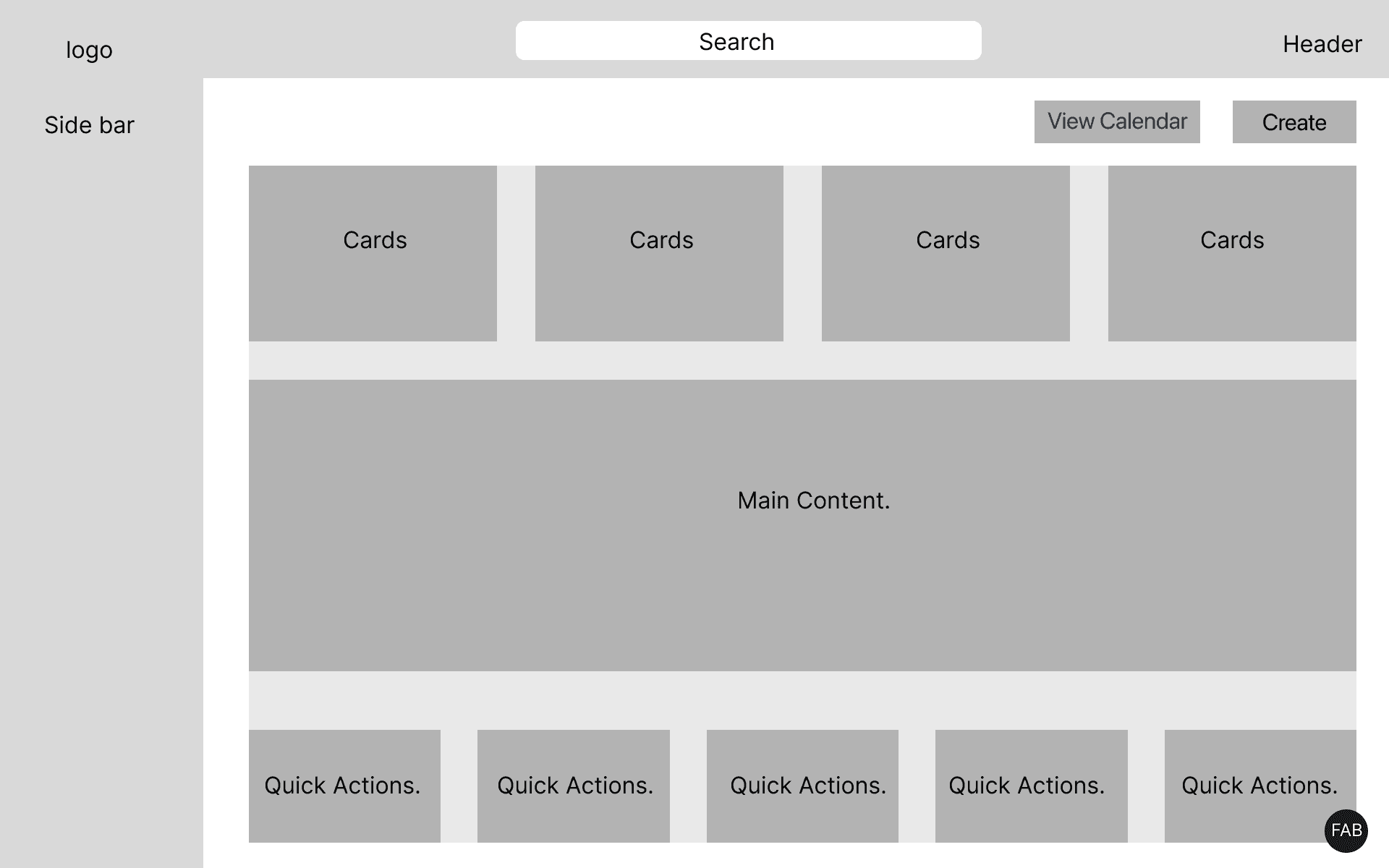
The sketches helped me validate the flow before moving into design:
What needs to appear first
How users move between Tasks, Team, and Analytics
How to reduce noise and keep the interface simple
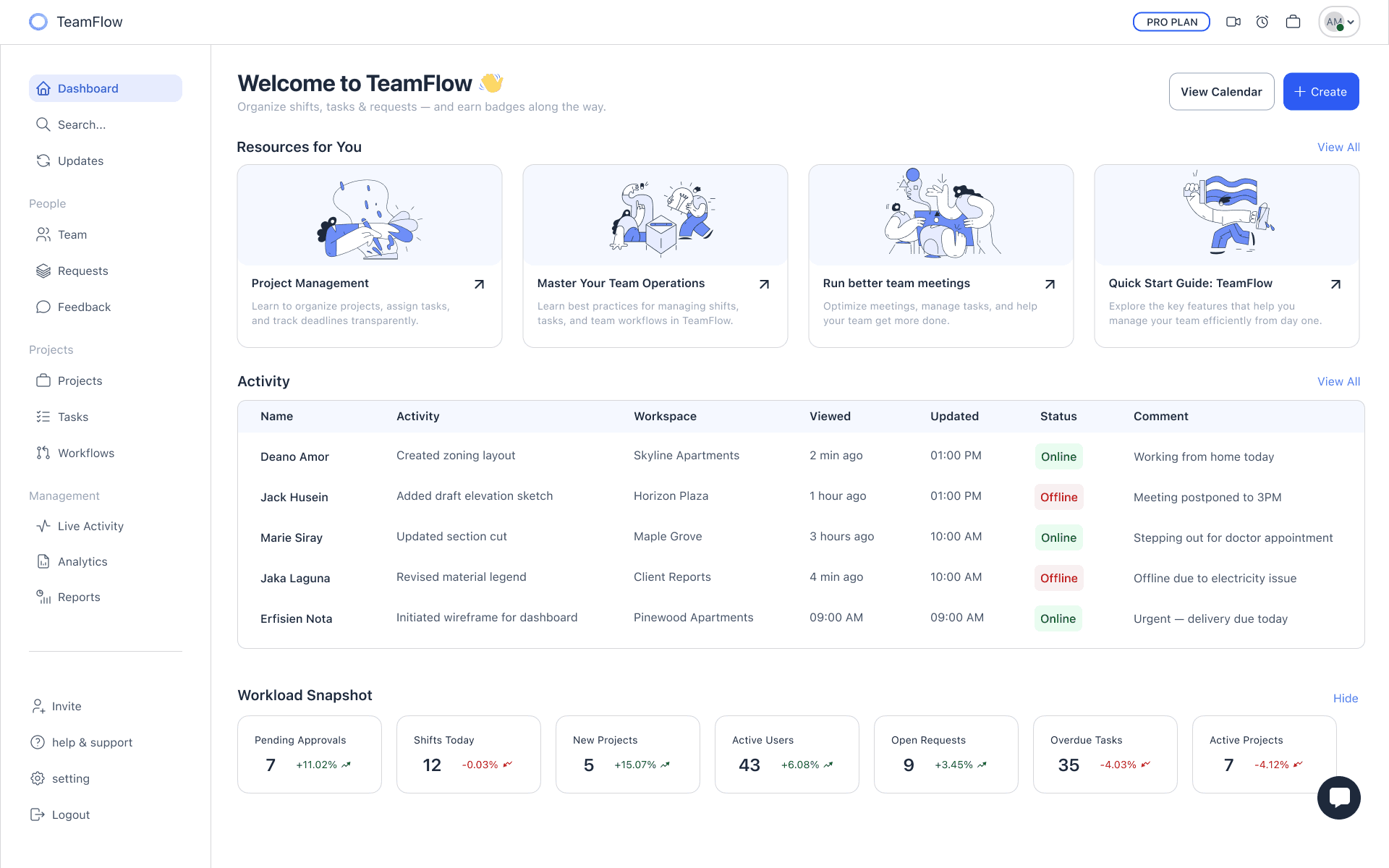
Dashboard
A home screen built for clarity one glance shows who’s here, what moved, and what needs attention.
5
AI-Powered Insight
A feature that analyzes work patterns in real time and highlights how each team member is handling their tasks.
AI Performance Overview
The system detects work pace, workload, and blockers, and gives managers a simple view of who’s progressing and who needs support. The goal is to spot overload early and keep the team stable.
AI Performance Overview
The system detects work pace, workload, and blockers, and gives managers a simple view of who’s progressing and who needs support. The goal is to spot overload early and keep the team stable.
AI Task Refinement
This feature reviews incoming tasks, sharpens the wording, identifies missing details, and suggests the right owner. It reduces misunderstandings and makes handoffs between team members smoother.
AI Task Refinement
This feature reviews incoming tasks, sharpens the wording, identifies missing details, and suggests the right owner. It reduces misunderstandings and makes handoffs between team members smoother.
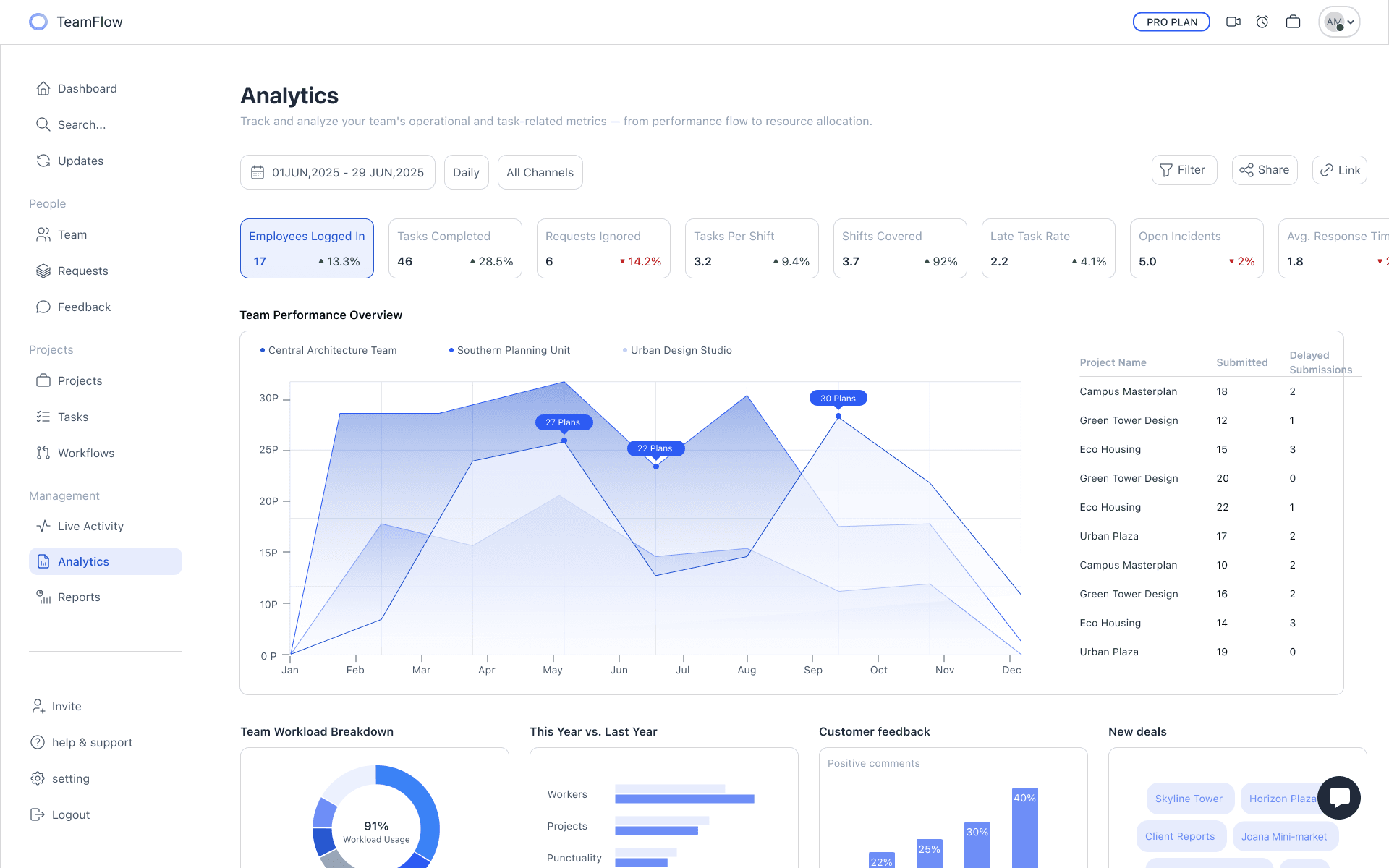
Turning Activity Into Insight
Track key metrics like completed tasks, shift coverage, and late rates in real time.
Clear charts turn raw activity into trends that guide smarter decisions.
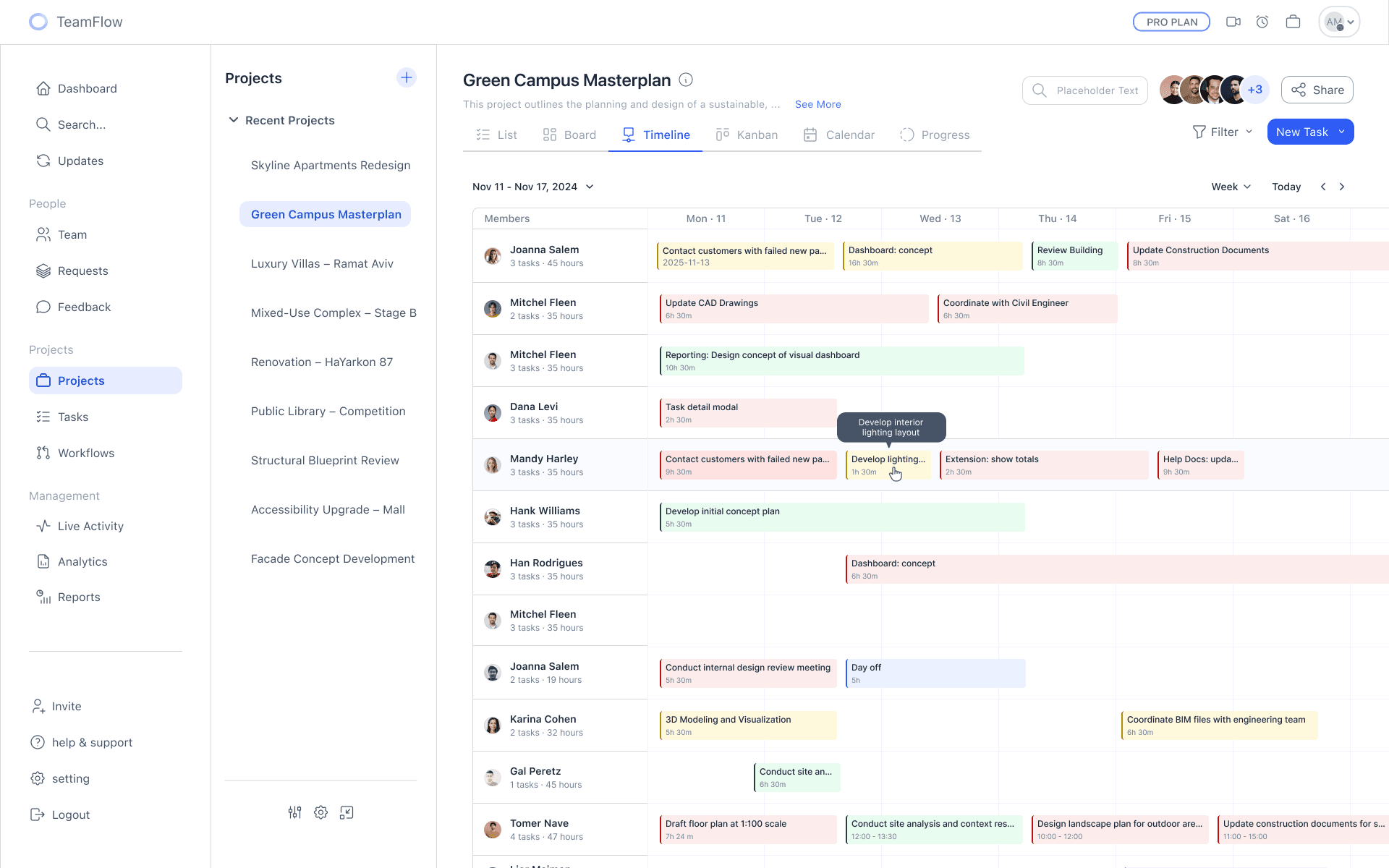
Project Timeline
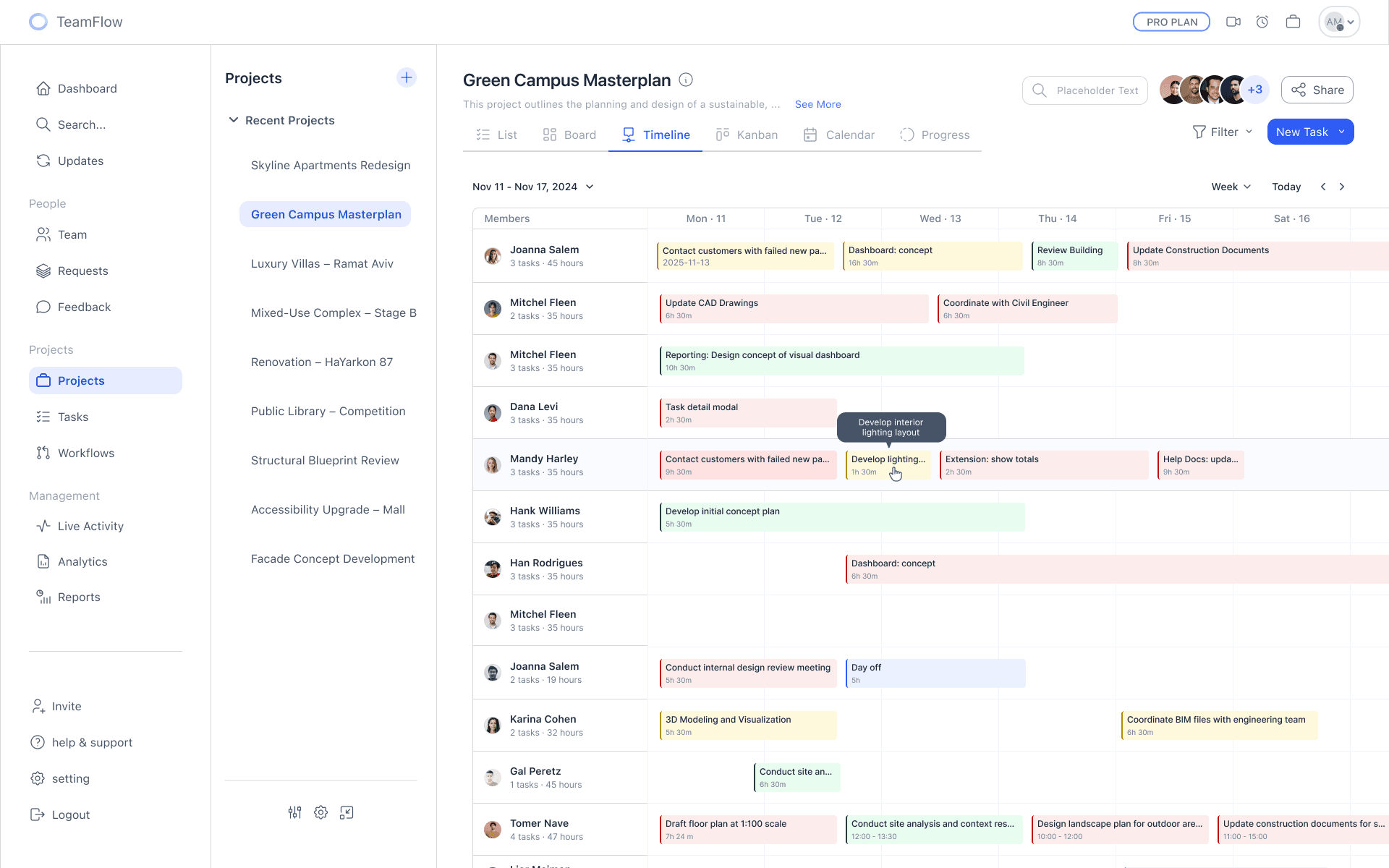
A weekly timeline showing tasks by status and priority, with colors and hover details that make bottlenecks easy to spot.
All In One Place
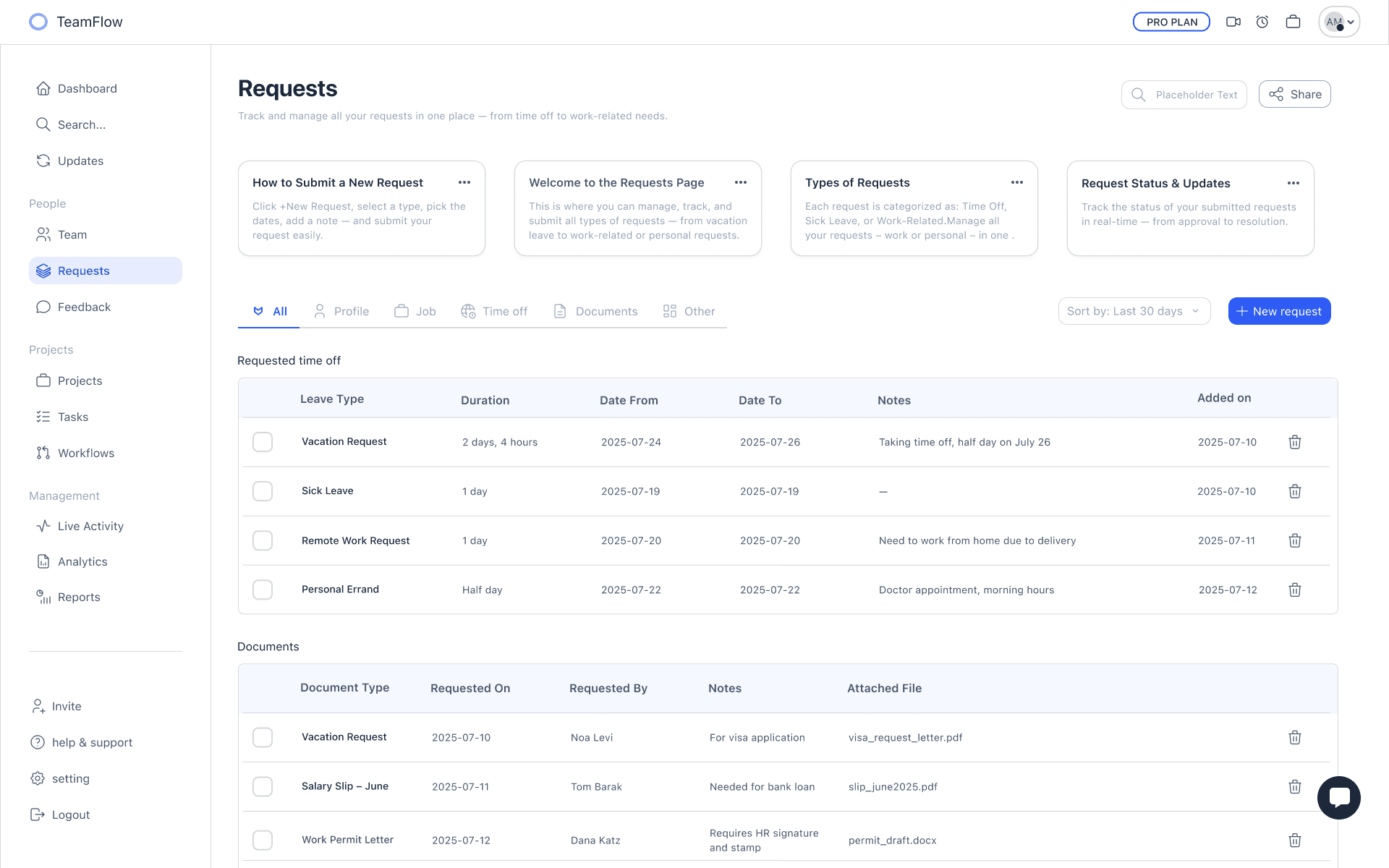
Manage every request vacation, sick leave, remote work, and documents in a single view.
Clear details and attached files keep the process simple, fast, and transparent.
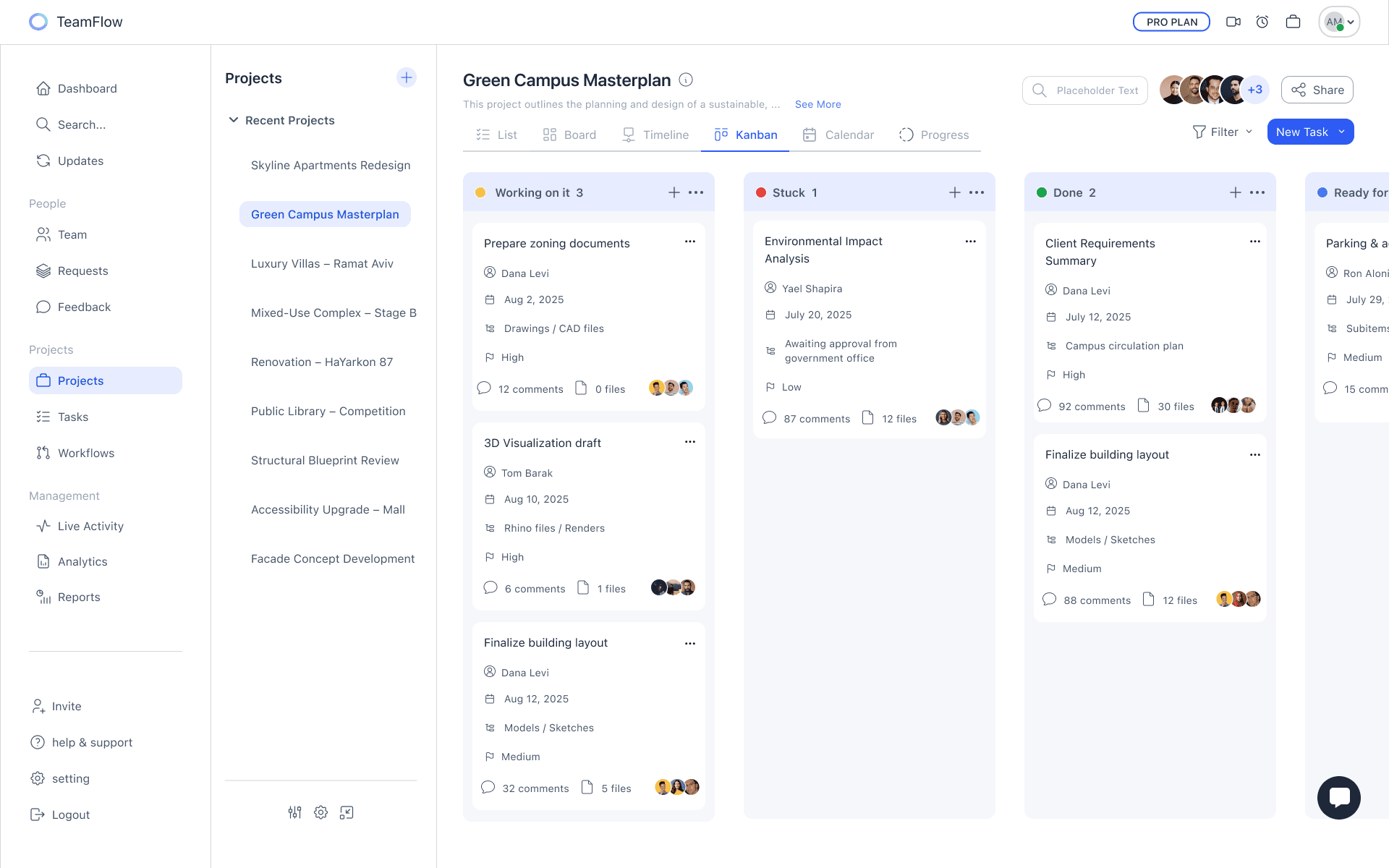
Kanban
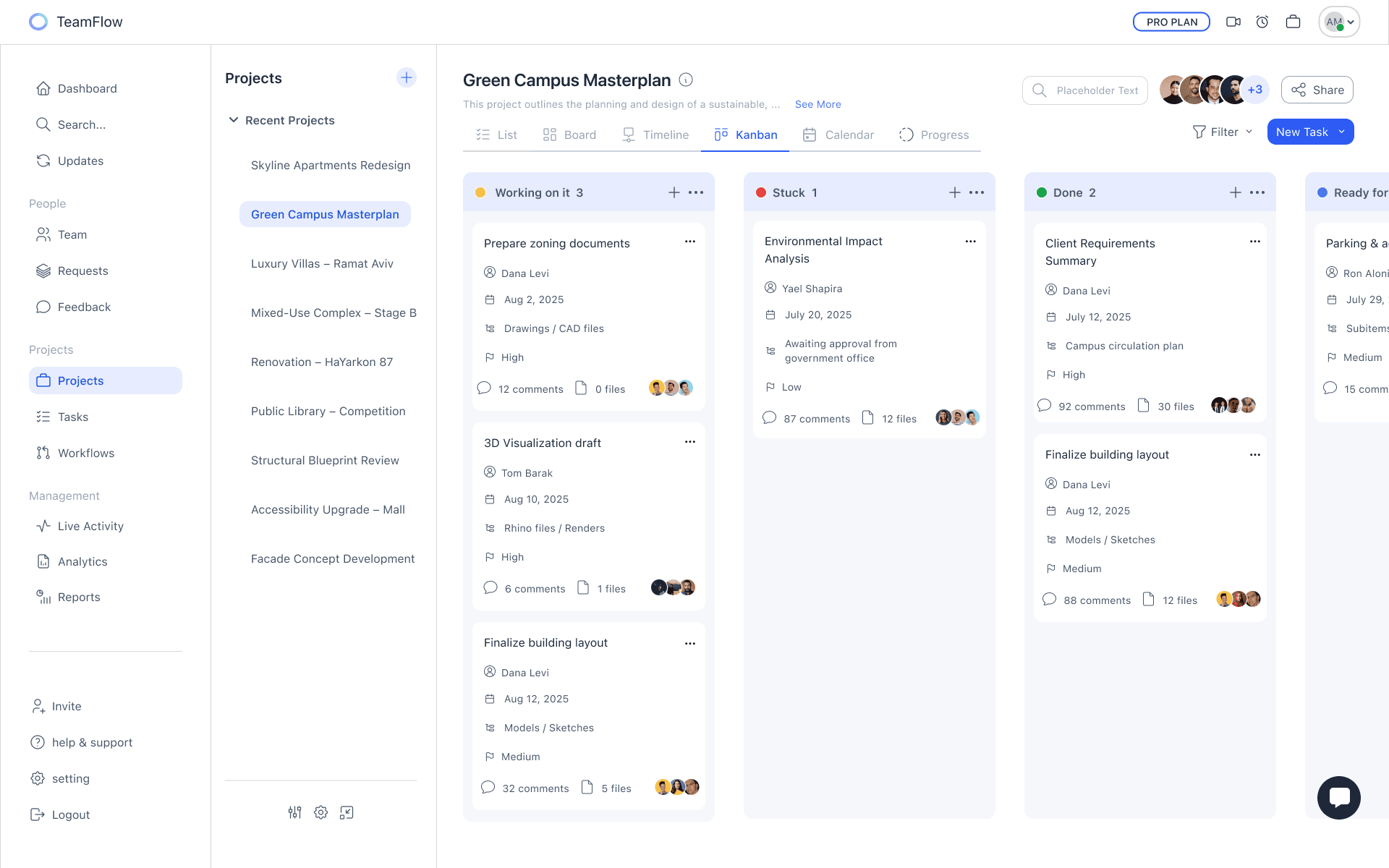
A Kanban board that shows tasks by status, with clear details like owner, due date, and priority making progress and bottlenecks easy to see at a glance.
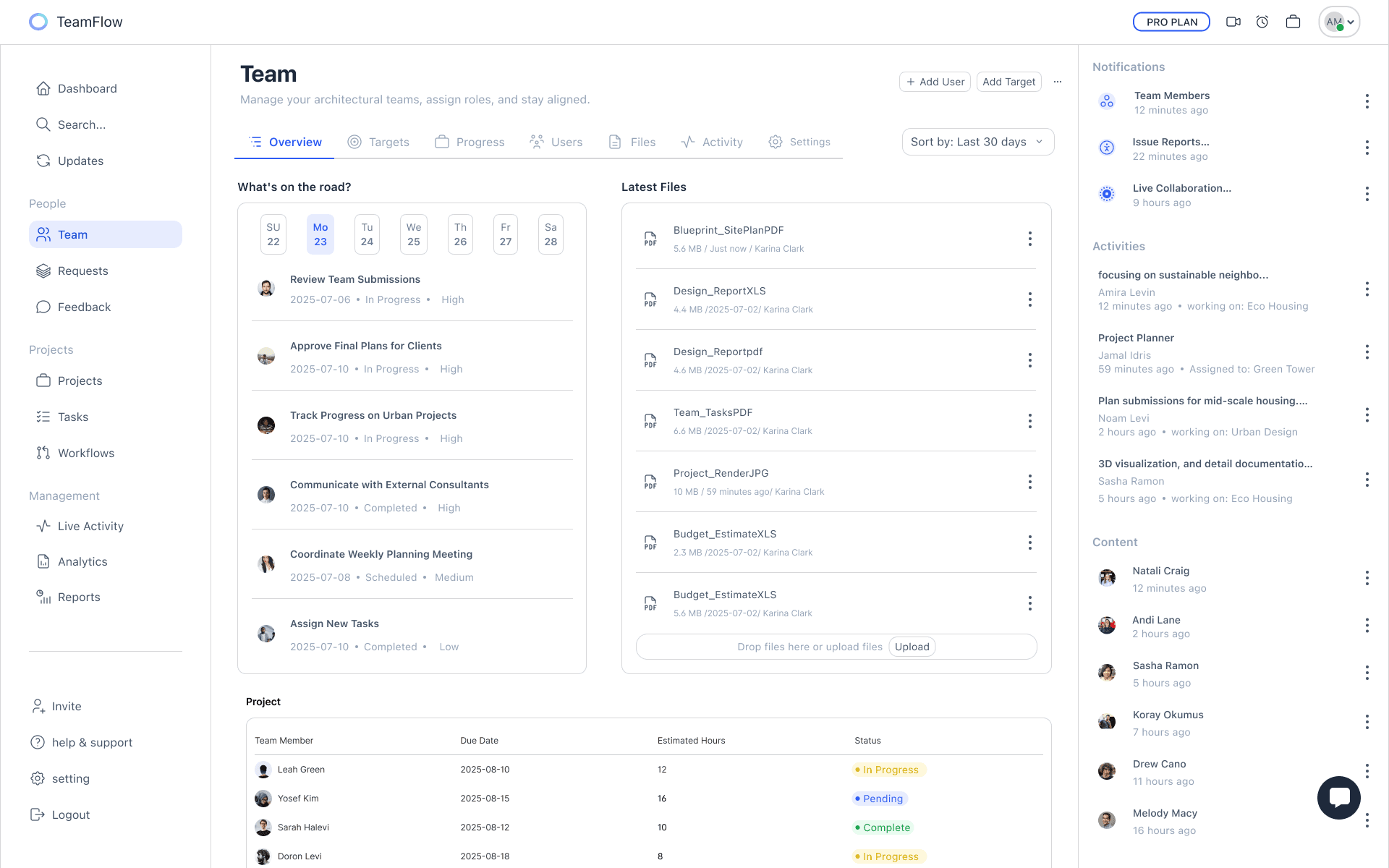
Team Stay Aligned And In Sync
The Team screen brings tasks, deadlines, and files into one place, making it easy to track progress, assign roles, and keep everyone aligned.
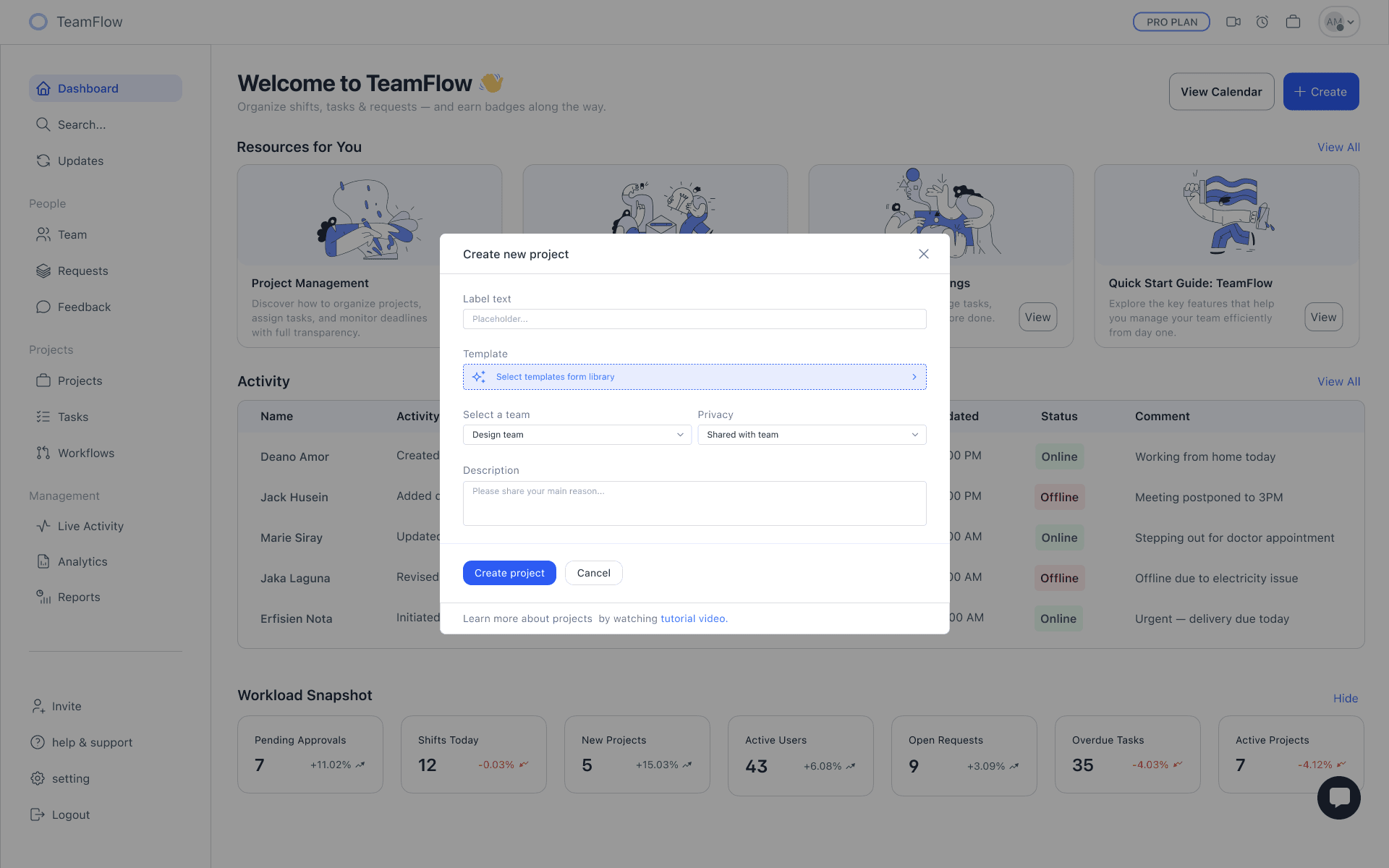
Create Project
The modal lets users quickly set up a new project by adding a label, choosing a template, assigning a team, and defining privacy.
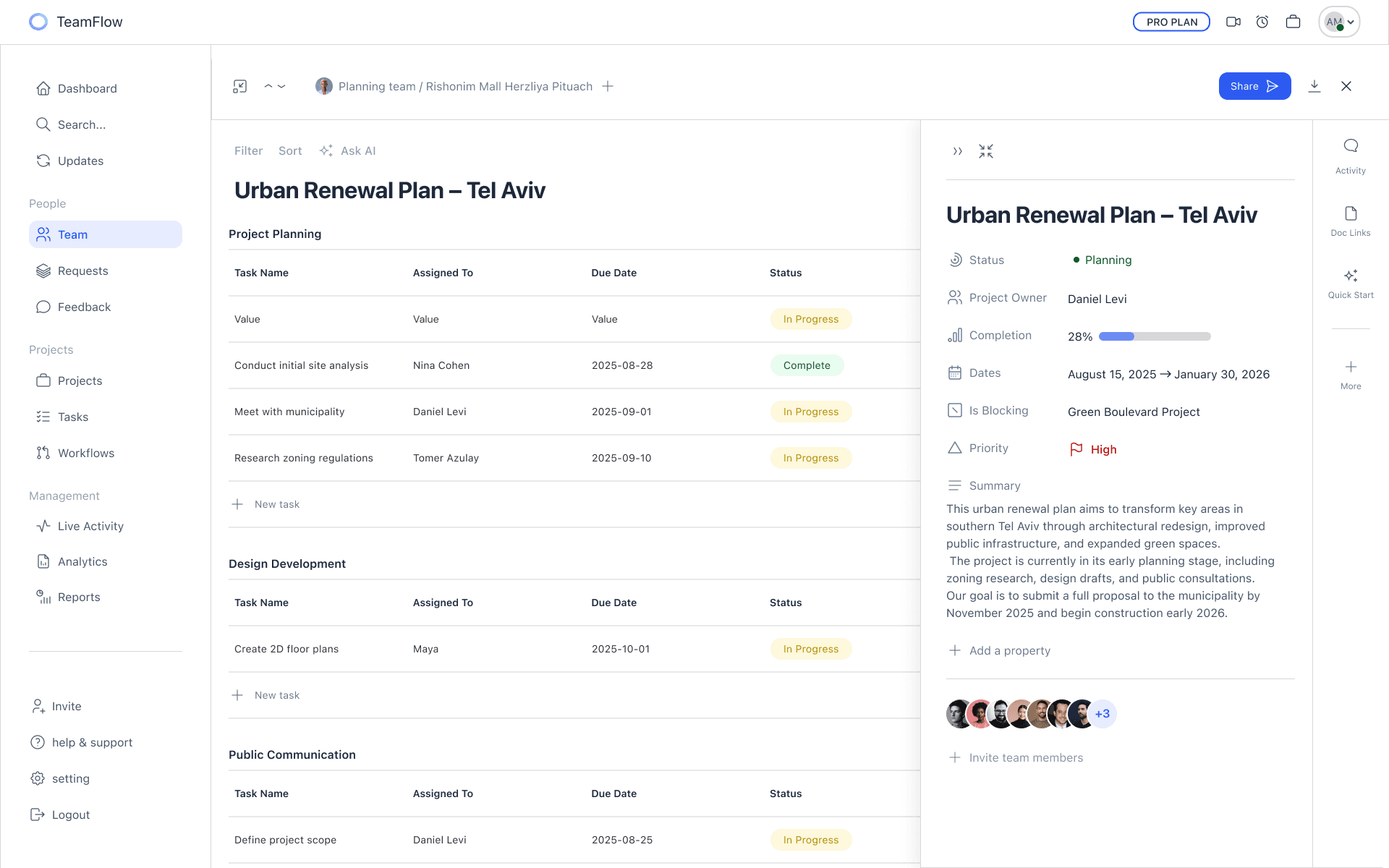
Full Context In One Screen
The Project View gathers tasks, status, key dates, and team info in one place combining detailed tracking with a clear overview.
7
7
7
This project taught me that clarity matters more than features.
I simplified messy workflows into one system managers can trust, and learned not to solve everything at once.
Next time, I’d focus more on mobile for people in the field.
This project taught me that clarity matters more than features.
I simplified messy workflows into one system managers can trust, and learned not to solve everything at once.
Next time, I’d focus more on mobile for people in the field.
4
AI-Powered Insight
A feature that analyzes work patterns in real time and highlights how each team member is handling their tasks.
AI Performance Overview
The system detects work pace, workload, and blockers, and gives managers a simple view of who’s progressing and who needs support. The goal is to spot overload early and keep the team stable.
AI Performance Overview
The system detects work pace, workload, and blockers, and gives managers a simple view of who’s progressing and who needs support. The goal is to spot overload early and keep the team stable.
AI Task Refinement
This feature reviews incoming tasks, sharpens the wording, identifies missing details, and suggests the right owner. It reduces misunderstandings and makes handoffs between team members smoother.
AI Task Refinement
This feature reviews incoming tasks, sharpens the wording, identifies missing details, and suggests the right owner. It reduces misunderstandings and makes handoffs between team members smoother.
Dashboard
Turning Activity Into Insight
Project Timeline
All In One Place
Kanban
Team Stay Aligned And In Sync
Full Context In One Screen
Full Context In One Screen